
 Character Options
 LEGO
LEGO Flair Leisure
 Hasbro
 Mattel
 MGA
MGA Moose
Moose Spin Master
 Vtech Electronics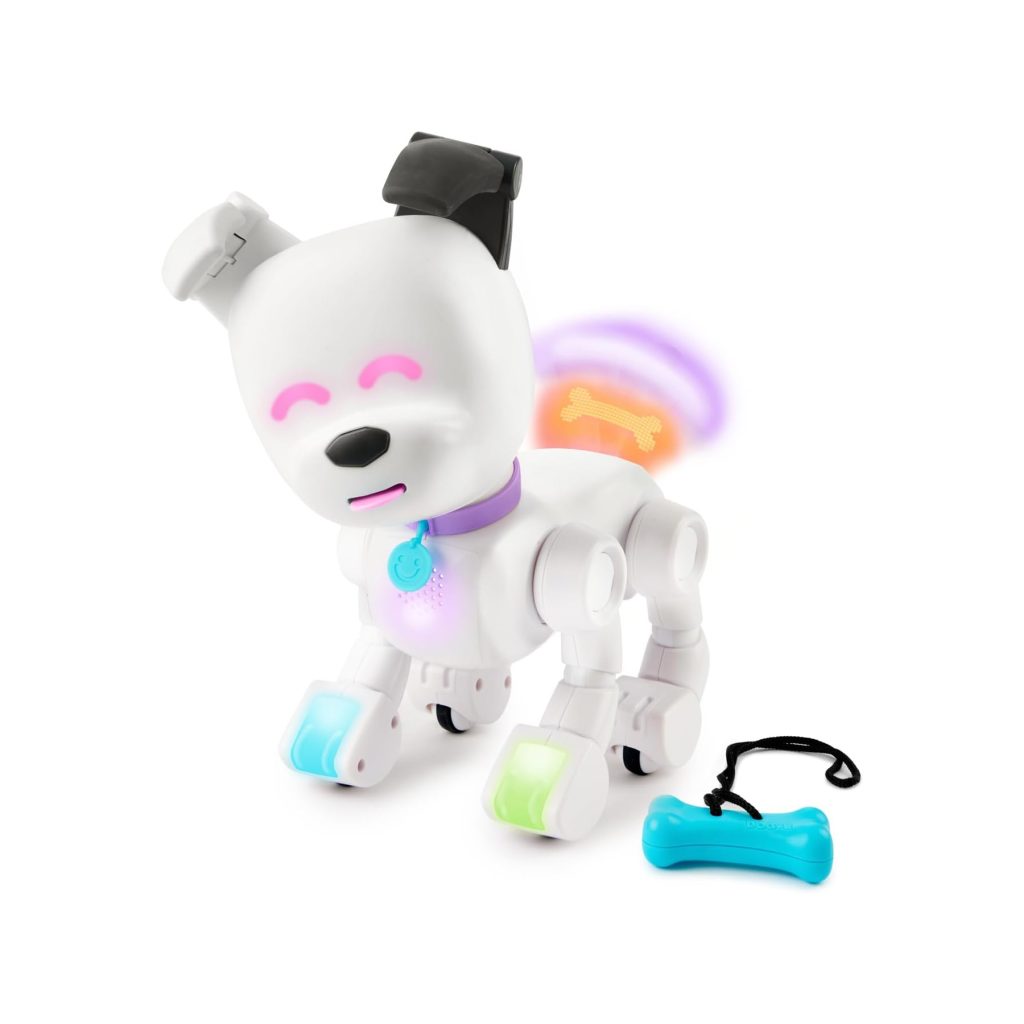
MINTiD Dog-E Parent Guide
MINTiD Dog-E Parent Guide
This MINTiD Dog-E Parent Guide offers clear, calm guidance to support parents with setup, safety, suitability and troubleshooting. For full product details, visit our main MINTiD Dog-E page, or explore hands-on impressions in our MINTiD Dog-E review. The goal is to help families feel confident when introducing this interactive robotic pet.
What’s in the Box
The MINTiD Dog-E typically includes the Dog-E robot, charging cable, accessory items such as stickers or tags, and an instruction leaflet. Some versions include a starter pack of customisation elements that help children personalise their Dog-E with colours, patterns or data-driven features. The robot’s face and tail display different light patterns to communicate mood or responses. For broader insight into the company’s product line, families can explore the WowWee page. Before introducing the toy to children, ensure Dog-E is fully charged and that all small accessories are placed safely within reach.
How It Works
MINTiD Dog-E uses sensors, programmed behaviours and a combination of lights, movements and sounds to respond to children. It can walk, wag its tail, make expressive face animations and perform tricks. Many units allow children to unlock personality traits through repeated play or initial setup steps. The MINTiD Dog-E Parent Guide supports parents by explaining that gentle interactions—touching the head, speaking clearly or guiding movement—enable Dog-E to respond predictably. Children often enjoy discovering new behaviours such as specific dances, responses to claps or unique tricks that activate over time.
Setup, Space & Batteries
Begin by fully charging Dog-E using the provided cable. Charging before first use ensures the robot performs consistently and avoids interruptions during initial excitement. Choose a flat indoor surface where the robot can walk without catching its feet on rugs or uneven flooring. Avoid outdoor play, as debris can interfere with Dog-E’s mechanics. Some versions may use an app for additional customisation, so parents should confirm compatibility and assist with setup. Keep the instruction leaflet nearby to help children understand the difference between light signals and motion indicators. Younger children may need help positioning Dog-E upright before play begins.
Best Age Range & Suitability
This interactive pet suits children who enjoy technology, imaginative play and character-driven interactions. Ideal ages typically fall within early to mid-primary school, though younger children may also enjoy observing Dog-E’s movements with supervision. Children who love caring for animals may appreciate routines built around virtual feeding, grooming or training. Those who enjoy coding or tech-based toys may find Dog-E especially appealing if personality traits or reactions unlock over multiple sessions. The robot encourages nurturing, predictable routines and discovery-based play.
Safety Notes
While Dog-E is designed for child-safe interaction, it contains moving parts and electronics requiring care. Parents should ensure play occurs on a stable, dry surface and that the robot is never exposed to water. Younger children should be reminded not to lift Dog-E by the legs or tail. If the robot bumps into furniture, encourage children to guide it gently rather than grabbing it abruptly. Keep hair, loose clothing and fingers away from moving joints. When charging, ensure Dog-E is placed on a flat surface away from heat sources and that only the provided cable is used. Store accessories out of reach of younger siblings.
Durability, Cleaning & Storage
Dog-E is built to handle everyday movements and interactions but should not be dropped, thrown or used outdoors. Clean the surface with a dry microfibre cloth to remove dust. Avoid moisture, as electronics and sensors are sensitive. If the wheels or feet collect debris, gently remove it with your fingers or a soft brush. Between play sessions, turn Dog-E off to preserve battery life. Store the robot upright in a cool, dry location. Accessories, such as stickers or tags, should be kept in a small box to prevent them from becoming misplaced or damaged.
Common Issues & Troubleshooting
If Dog-E does not power on, confirm it is fully charged and that the cable connection is secure. Should the robot fail to respond to gestures, ensure it is on a stable, flat surface and that children’s movements are slow and clear. If Dog-E moves erratically, debris may be caught in the wheels; cleaning them usually resolves the issue. If sounds or lights malfunction, switching the robot off and on often restores correct behaviour. Dog-E may occasionally freeze during complex actions; a gentle reset using the power switch typically resolves this. If personality data does not load, check app connectivity or retry setup steps.
Tips
Parents can ease the learning curve by demonstrating simple gestures first, such as stroking Dog-E’s head or speaking to it from a short distance. Encourage children to observe light patterns that indicate mood or state, helping them understand when Dog-E is ready for interaction. The MINTiD Dog-E Parent Guide also suggests building short play routines—morning greetings, trick practice or “walk time”—to boost engagement. Children may enjoy decorating Dog-E with supplied accessories or creating small obstacle courses for the robot to explore. Patience is important, especially for young children discovering how sensors interpret movement.
Alternatives
Families who enjoy robotic pets may also appreciate other interactive companions featuring sound, movement or customisable personalities. For children seeking simpler nurturing play, soft plush pets with touch sensors may offer a gentler introduction to interactive toys. Children who love building or coding may prefer programmable robots, while those drawn to caring for animals may enjoy virtual pet devices or realistic plush toys. For younger siblings, simpler interactive toys with basic responses are more age-appropriate than complex robotic pets.
Quick FAQs
Does Dog-E need an app?
Some versions include optional app interactions, but basic play does not require it.
Can Dog-E go outside?
No—indoor play only.
Why isn’t Dog-E responding?
Check the surface, charge level and ensure no debris is affecting wheels or sensors.
What age is Dog-E suitable for?
Typically early to mid-primary ages.
Where can parents find more guidance?
Visit our MINTiD Dog-E page for additional support.
Where Next?
For product details, visit the main MINTiD Dog-E page.
For hands-on insights, explore our MINTiD Dog-E review.
Some links on our site are affiliate links. If you buy through them, we may earn a small commission — at no extra cost to you. 🎄