
 Character Options
 LEGO
LEGO Flair Leisure
 Hasbro
 Mattel
 MGA
MGA Moose
Moose Spin Master
 Vtech Electronics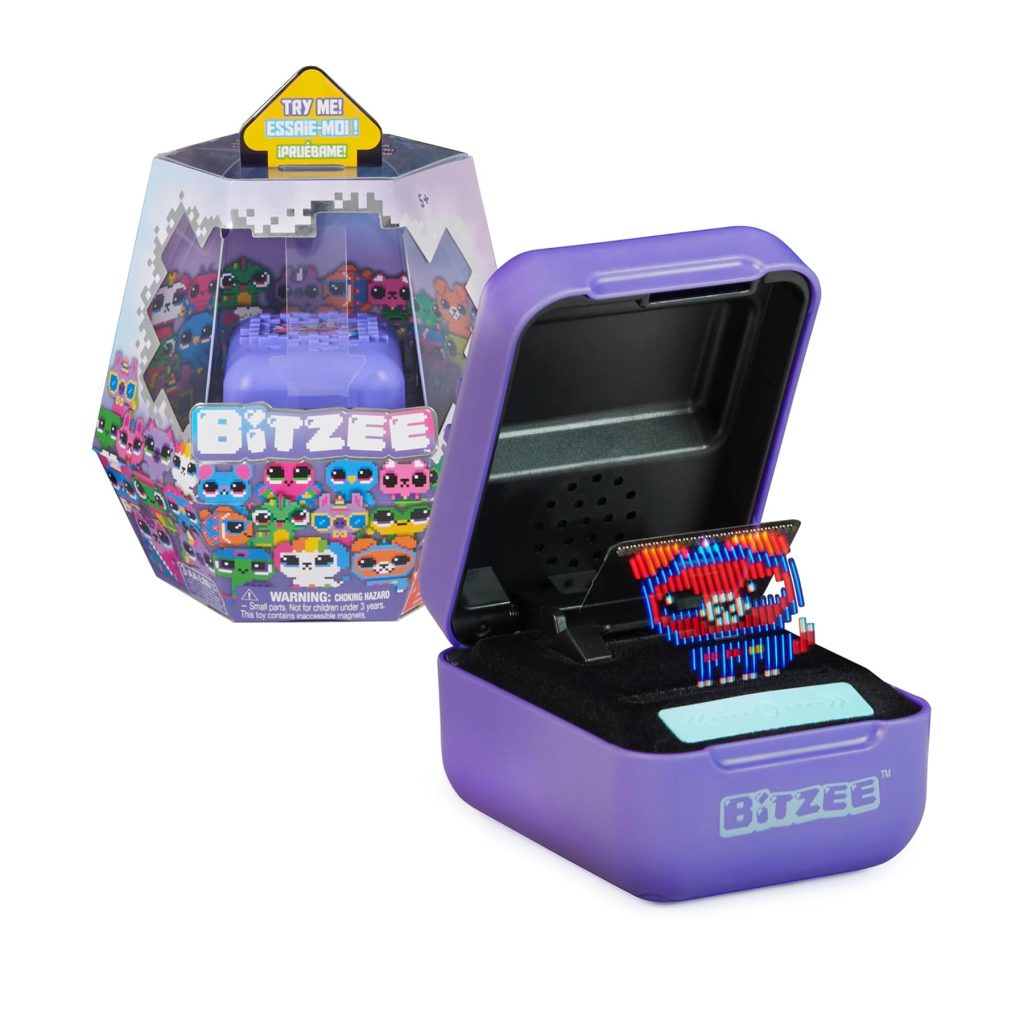
Bitzee Interactive Pet Parent Guide
Bitzee Interactive Pet Parent Guide
This Bitzee Interactive Pet Parent Guide gives parents clear, calm support for setup, safety, suitability and troubleshooting. For full product details, visit our main Bitzee Interactive Pet page, or explore hands-on impressions in our Bitzee Interactive Pet review. The aim is to help families understand how Bitzee works and how to create a smooth and enjoyable first experience.
What’s in the Box
A Bitzee Interactive Pet set usually includes the handheld Bitzee device, a fold-out playspace, an instruction sheet and a starter pet already programmed into the unit. Children unlock further pets as they learn commands and complete simple interactions. The device is lightweight and built for everyday handling. Parents looking for wider brand information can explore the Spin Master page for more context on related interactive toys. Before setup, ensure all packaging has been removed and that the device shows no loose protective tapes around its folding display.
How It Works
This digital pet uses a layered, fold-out screen that displays animated characters responding to children’s touch and gestures. Bitzee recognises taps, swipes and holds, turning familiar touchscreen-style actions into pet-care tasks. Children feed, clean, play with and evolve their digital pet by performing movements that the device interprets as interactions. As they progress, new pets unlock, each with slightly different behaviours or animations. The Bitzee Interactive Pet Parent Guide helps parents understand how to introduce these gestures at a comfortable pace, ensuring that younger children do not become overwhelmed by the variety of interaction options presented early in play.
Setup, Space & Batteries
The Bitzee Interactive Pet is battery powered, so parents should check whether the device includes starter batteries or requires new ones before play. Install batteries prior to handing it to younger children to avoid excitement turning into early frustration. Choose a quiet table or sofa area for the first play session to help children focus on learning commands. Because the fold-out display is delicate, encourage children to open and close it gently and only when the device instructs them to do so. A small tray nearby is helpful for storing the instruction sheet if the child wants to reference pet-care requirements while interacting with the device.
Best Age Range & Suitability
The Bitzee Interactive Pet is ideal for children comfortable with simple digital interactions who enjoy caring for virtual pets. It suits early primary school children who can follow basic instructions and remember short routines. Children who enjoy screen-free or low-screen alternatives may respond well to Bitzee’s hybrid design: it feels like a physical toy while offering digital character expression. The toy encourages responsibility, patience and routine, which can appeal to children who enjoy daily tasks or collecting achievements. If a child loves Tamagotchi-style pets, touchscreen interactions or unlocking new characters, this set is a strong match.
Safety Notes
Although the device contains no small detachable parts, parents should ensure younger siblings do not handle it unattended. The fold-out screen should never be forced open or closed, as pressure on the flexible display can cause damage. Avoid exposure to water, food or extreme temperatures, as these may interfere with the display or internal mechanisms. If the device becomes unresponsive, do not attempt to pry it open; instead, remove and reinstall batteries following the instructions. Keep the device away from sand, dust and rough surfaces that could scratch or damage the folding layers. Always store the device closed after use to maintain screen safety.
Durability, Cleaning & Storage
The Bitzee device is sturdy when handled correctly, though the folding display requires gentle treatment. Parents should remind children to hold the device with two hands rather than gripping the screen edges. Clean the surface using a soft, dry cloth, avoiding liquids or cleaning sprays. Dust can gather within the folds, so lightly brushing those areas helps keep the mechanism smooth. For storage, a bedside drawer or lidded container works well, protecting the fold-out display from accidental pressure. If multiple children share the toy, consider setting simple rules about gentle handling to help preserve the screen for long-term use.
Common Issues & Troubleshooting
If children struggle to trigger commands, check the speed and firmness of their gestures. Taps should be gentle and consistent, and swipes should be smooth rather than rushed. If the device fails to recognise actions, ensure the display is fully extended. Some pets require particular timing for reactions, so demonstrating one or two sequences often helps children quickly adapt. Should the device freeze or animations lag, battery replacement usually resolves the issue. If unlocked pets appear missing, confirm that the child completed all steps in their sequence; repeated interactions often reveal the missing stage.
Tips
To support early confidence, allow children to focus on one pet at a time before attempting to unlock new characters. This helps prevent overwhelm and encourages a sense of mastery. Keeping the instruction sheet nearby allows children to reference commands without feeling pressured. Encourage children to narrate their pet-care routine, which strengthens imaginative play and helps younger children remember steps more easily. The Bitzee Interactive Pet Parent Guide also recommends taking short breaks during longer sessions to avoid overstimulation. Families may find it helpful to set a small routine around Bitzee, such as checking on the pet at set times each day.
Alternatives
Families who enjoy Bitzee’s digital interaction style may also appreciate other non-screen or low-screen virtual pet toys. Toys with motion sensors, expressive sounds or evolving characters provide similar engagement. If a child enjoys collecting digital pets, consider sets with expansion packs or unlockable characters. For children who prefer physical movement, interactive plush toys that respond to touch or sound may be a suitable alternative. Those who enjoy caring for virtual animals on tablets or consoles may find Bitzee a lighter, more tangible version of app-based pet experiences.
Quick FAQs
Does Bitzee require an app?
No, all interactions happen within the device.
What age is Bitzee best for?
Typically early primary ages, depending on familiarity with simple digital gestures.
Does the device need charging?
It uses batteries; check packaging for the exact type.
What if the display stops responding?
Try replacing batteries and fully reopening the display.
Where can parents find more guidance?
Visit our Bitzee page for additional support.
Where Next?
For product details, visit the main Bitzee Interactive Pet page.
For hands-on insights, explore our Bitzee Interactive Pet review.
Some links on our site are affiliate links. If you buy through them, we may earn a small commission — at no extra cost to you. 🎄