
 Character Options
 LEGO
LEGO Flair Leisure
 Hasbro
 Mattel
 MGA
MGA Moose
Moose Spin Master
 Vtech Electronics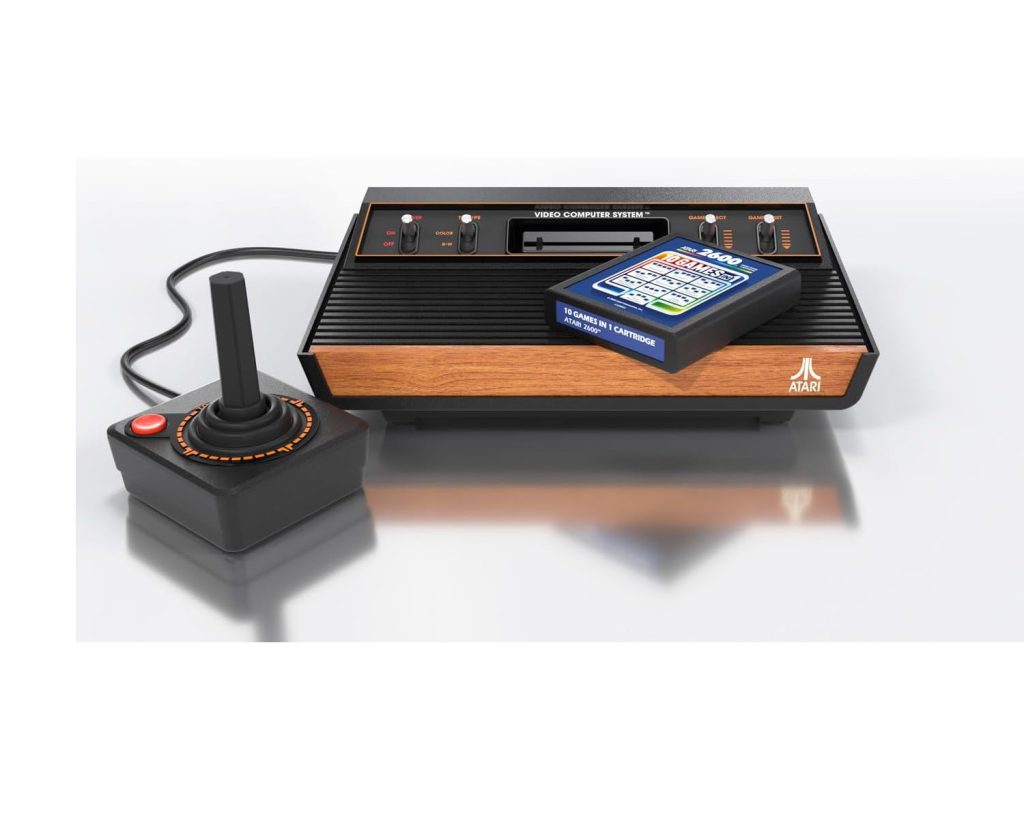
Atari 2600 Plus Parent Guide
Atari 2600 Plus Parent Guide
Atari 2600 Plus Parent Guide provides parents with a clear overview of how this retro-inspired console functions in modern family settings. This guide focuses on usability, space considerations, age suitability, setup steps, durability and maintenance, helping families understand what to expect before and after unboxing.
What’s in the Box
The Atari 2600 Plus typically includes the main console unit, one joystick controller, power cable, and a compatible game cartridge. Some bundles may include additional titles, but the core setup remains simple. All components are built with a retro look while maintaining up-to-date reliability standards. The joystick is intentionally minimal to reflect the original 1980s experience.
Parents who want to understand more about the company behind the console can explore the Atari brand page. Knowing the manufacturer is useful if you already own other Atari products or are comparing the 2600 Plus to similar nostalgia-driven entertainment devices.
How It Works
While compiling this Atari 2600 Plus Parent Guide, the focus was on how families actually interact with the console during daily use. Once powered on and connected to your television, the device loads the inserted cartridge almost instantly. Games rely on simple directional inputs, a single action button, and fast reflexes, making the experience approachable for younger players and nostalgic for adults.
The system is intentionally limited in complexity. There are no menus, online connectivity requirements, or account setups. Children learn quickly because gameplay relies on short sessions and intuitive controls. This simplicity makes it a suitable shared activity between older and younger family members, especially when introducing children to retro-style gaming in a safe, controlled environment.
Setup, Space & Batteries
Setup is straightforward. The console connects to the TV via HDMI, which eliminates older compatibility issues. Place the unit near your TV, ensuring the controller cable has enough reach for comfortable play. Because the console is compact, it works well in small living rooms or bedrooms without needing extra furniture.
No batteries are required for the console or joystick. All power comes from the included cable. For households with multiple devices plugged into the TV, consider a labelled power strip or cable organiser to avoid confusion. Ensure the controller cable is not stretched tightly, as younger children may tug unintentionally during gameplay.
Best Age Range & Suitability
The Atari 2600 Plus is well-suited for children aged 7+ who enjoy fast, simple games with clear goals. Younger children can join in with supervision, as the one-button joystick is easier to manage than modern multi-button controllers. The console is also helpful for building hand–eye coordination through short bursts of gameplay.
The device appeals to mixed-age households, as parents may recognise classic titles and enjoy sharing them with their children. Its low-pressure gameplay style works for after-school relaxation, family gaming nights, or short sessions between homework and evening routines.
Safety Notes
The console housing and joystick are robust, but parents should ensure cables are not stretched across walkways or placed where trips may occur. Regularly inspect the controller wire for twisting or sharp bends. The joystick’s small moving parts should also be checked occasionally for dust buildup.
Because the console plugs directly into the TV, younger children should be reminded not to disconnect cables without permission. The cartridge slot should be kept free of crumbs and debris to maintain long-term reliability. As with all electronic devices, keep liquids away from the play area.
Durability, Cleaning & Storage
The Atari 2600 Plus is built with sturdy plastics and a retro aesthetic designed for long-term use. The joystick is durable but benefits from gentle handling, especially during games that require rapid movement. Cartridges should be stored in a dry location and inserted carefully to avoid damaging the connector pins.
Cleaning the console requires only a soft dry cloth. Avoid sprays or liquids near the ports. When not in use, the compact size allows it to fit easily into a media unit or drawer. Wrapping the controller cable loosely helps prevent fraying and preserves responsiveness over time.
Common Issues & Troubleshooting
No picture on the TV: Ensure the HDMI cable is fully inserted on both ends and that the TV is set to the correct input. Try switching ports if issues continue.
Games not loading: Remove the cartridge, check for dust, and reinsert firmly. Avoid blowing into the cartridge, as moisture can damage the connectors.
Joystick response feels delayed: Ensure the cable isn’t twisted and check that children aren’t pressing the action button too lightly. Most gameplay issues come from loose cable connections rather than the controller itself.
Tips
One of the best ways to use this Atari 2600 Plus Parent Guide is to introduce games in short bursts. Retro titles typically increase in speed or intensity, so letting children practise for a few minutes before committing to longer sessions helps reduce frustration.
Families often create small competitions by tracking high scores on paper or whiteboards. This keeps the experience cooperative and fun rather than overly competitive. Rotating games regularly also maintains interest, especially for children who enjoy exploring different visual styles and challenges.
Alternatives
Families who enjoy the retro style of the Atari 2600 Plus may also appreciate other compact plug-and-play systems that offer simple classics. Handheld retro devices are another option for children who prefer portable play. When comparing alternatives, consider controller size, preloaded game variety, and how easily the device integrates into your home media setup.
For children who prefer more modern experiences, entry-level consoles with simple puzzle or platform games may be more suitable. Matching a device to your child’s preferred playstyle makes the experience smoother and more engaging.
Quick FAQs
Is the console suitable for young children?
Yes, with supervision. The one-button joystick is manageable for most beginners.
Do the games run instantly?
Yes. Insert the cartridge and the game typically loads immediately.
How do we maintain the joystick?
Keep the cable untwisted and store it loosely when not in use.
Does this support learning?
Retro gaming encourages hand–eye coordination and fast reactions.
What does this Atari 2600 Plus Parent Guide cover?
It explains setup, safety, suitability, troubleshooting and how to support children during early play sessions.
Where Next?
Explore full product details on the Atari 2600 Plus page.
For hands-on observations and extended feedback, visit the Atari 2600 Plus Review.
Some links on our site are affiliate links. If you buy through them, we may earn a small commission — at no extra cost to you. 🎄