
 Character Options
 LEGO
LEGO Flair Leisure
 Hasbro
 Mattel
 MGA
MGA Moose
Moose Spin Master
 Vtech Electronics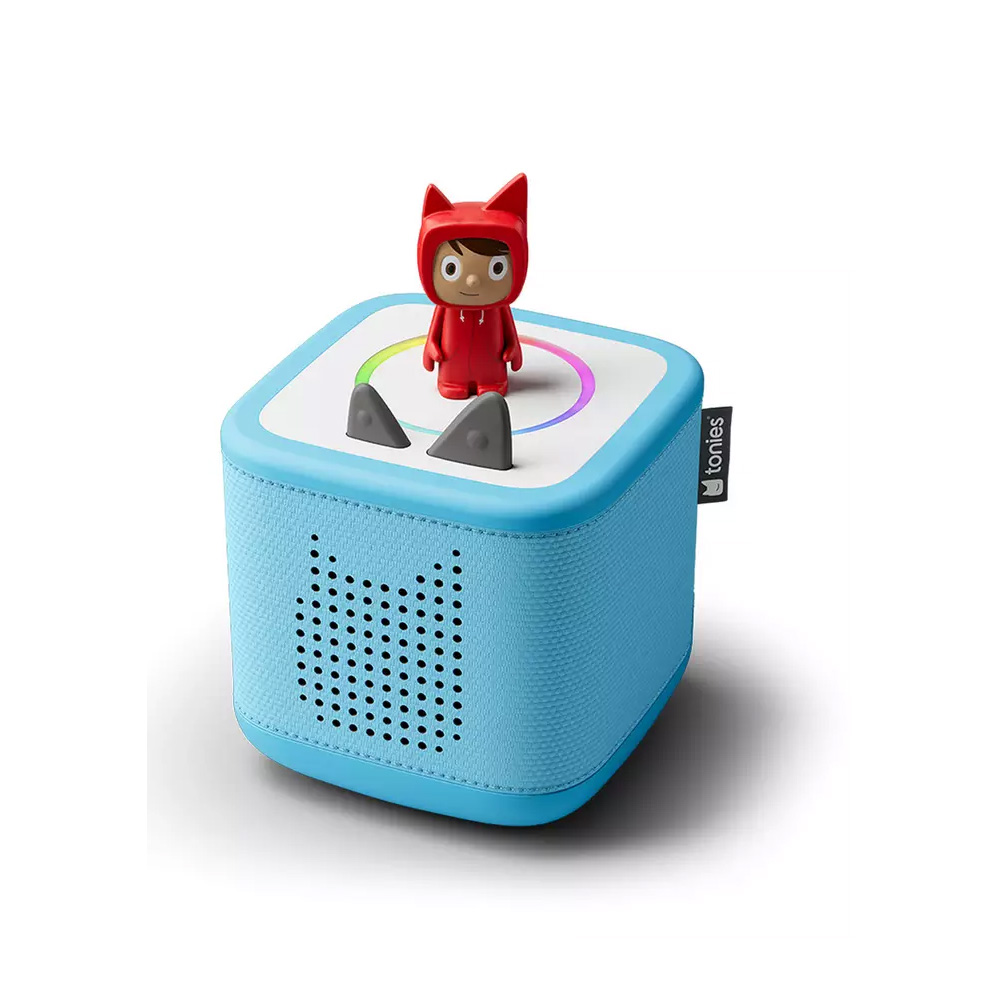
Toniebox Creative Set Parent Guide
Toniebox Creative Set Parent Guide
Toniebox Creative Set Parent Guide offers parents a clear explanation of how this Tonies starter bundle works in everyday family life. This guide covers setup, content recording, battery expectations, safety, maintenance, troubleshooting and suitability for different ages. The aim is to help families create smooth, screen-free listening routines while making full use of the Creative-Tonie’s custom audio potential.
What’s in the Box
The Toniebox Creative Set usually includes the Toniebox unit, a Creative-Tonie figure, a charging station and instructions for setup. The Creative-Tonie is a blank, recordable figure that stores personalised audio uploaded through the Tonies app. Children also have access to tap-and-squeeze navigation for chapter skipping and volume control, giving them independent control over listening time.
Families wanting broader brand context can visit the Tonies page, which highlights compatible Tonies, expansion opportunities and educational audio options.
How It Works
For this Toniebox Creative Set Parent Guide, we explored how children interact with the device’s gesture controls and how families use personalised audio. Placing the Creative-Tonie on the top panel triggers playback of uploaded stories, music, messages or routines. Parents can record their own audio or upload existing files using the Tonies app.
Once audio is added, the Toniebox stores content locally, allowing offline listening. Children squeeze the ears to adjust volume, tap the sides to skip chapters and lift the figure to pause. These simple, predictable controls help children use the device independently after a short learning period.
Setup, Space & Batteries
The Toniebox requires an initial Wi-Fi setup to link the device to the Tonies app and activate the Creative-Tonie. After activation, content syncs wirelessly and remains stored on the device for offline play. Parents should charge the Toniebox fully before its first session.
A quiet, comfortable space—such as a reading nook or bedroom corner—works well for listening sessions. Keeping the device on a stable surface reduces accidental knocks. The charging station should be placed somewhere accessible, as regular top-up charging maintains battery performance for longer audio sessions.
Best Age Range & Suitability
The Toniebox Creative Set is suitable for children aged 3 and up. Younger children enjoy tapping for simple stories, while older children engage more deeply with personalised recordings. Families often use Creative-Tonies to store bedtime messages, morning routines or supportive audio for travel or transitional moments.
This set suits children who respond well to predictable routines and who enjoy screen-free storytelling. It also supports early language development, concentration skills and emotional comfort, especially when personalised messages are included.
Safety Notes
The Toniebox features a soft, padded exterior that is safe for everyday handling. Children should still avoid throwing or dropping the device, especially during wireless playback. The charging station should be used only on dry surfaces, away from water or food spills.
Creative-Tonies contain small internal components and magnets, so they should not be placed in mouths. Parents should monitor younger siblings and store figures safely when not in use.
Durability, Cleaning & Storage
The Toniebox’s fabric cover withstands regular handling and can be wiped with a soft, damp cloth when dusty. Avoid abrasive cleaners or soaking the device, as moisture may affect internal components. The Creative-Tonie figure is sturdy but should be handled gently to keep the base connector clean.
For storage, families often use small bowls, trays or magnetic racks to keep Tonies organised. Labelling Creative-Tonies—e.g., bedtime stories, family messages, music—helps children find content independently and encourages consistent routines.
Common Issues & Troubleshooting
Tonie not playing: Remove and reattach the figure. If still unresponsive, restart the Toniebox or check battery level.
Custom audio not uploading: Ensure the device and app are connected to stable Wi-Fi during sync. Reopening the app usually resolves temporary delays.
Audio cuts out: Low battery often reduces consistency. Recharge the Toniebox fully.
Tips
This Toniebox Creative Set Parent Guide highlights how families can personalise the experience for long-term value. Many parents record bedtime stories, motivational messages or calming music for routines. Rotating content monthly keeps listening sessions fresh and encourages children to explore different themes.
Another helpful approach is creating a “listening basket” with books, cushions and select Tonies that match the week’s theme. This supports independent reading and calm transitions and helps children discover new favourite stories.
Alternatives
Families who enjoy screen-free audio may also appreciate music cubes, child-friendly story players or beginner podcasts designed for young listeners. These alternatives offer varying formats and content styles.
If children prefer craft-based creativity, personal storytelling kits or imaginative character sets might be better suited. For those who want more advanced audio exploration, beginner-friendly smart speakers with parental controls provide broader content—but rely more heavily on spoken commands.
Quick FAQs
Does the Toniebox require Wi-Fi?
Only during initial setup and to upload custom audio.
Is the Creative-Tonie reusable?
Yes. Parents can overwrite or update content at any time.
Can children use it independently?
Yes. Gesture controls are designed for young users.
How durable is the device?
The soft exterior protects it during normal use.
What does the Toniebox Creative Set Parent Guide cover?
Setup, safety, troubleshooting, suitability and personalised content tips.
Where Next?
Explore full product details on the Toniebox Creative Set page.
For hands-on impressions and detailed insights, visit the Toniebox Creative Set Review.
Some links on our site are affiliate links. If you buy through them, we may earn a small commission — at no extra cost to you. 🎄