
 Character Options
 LEGO
LEGO Flair Leisure
 Hasbro
 Mattel
 MGA
MGA Moose
Moose Spin Master
 Vtech Electronics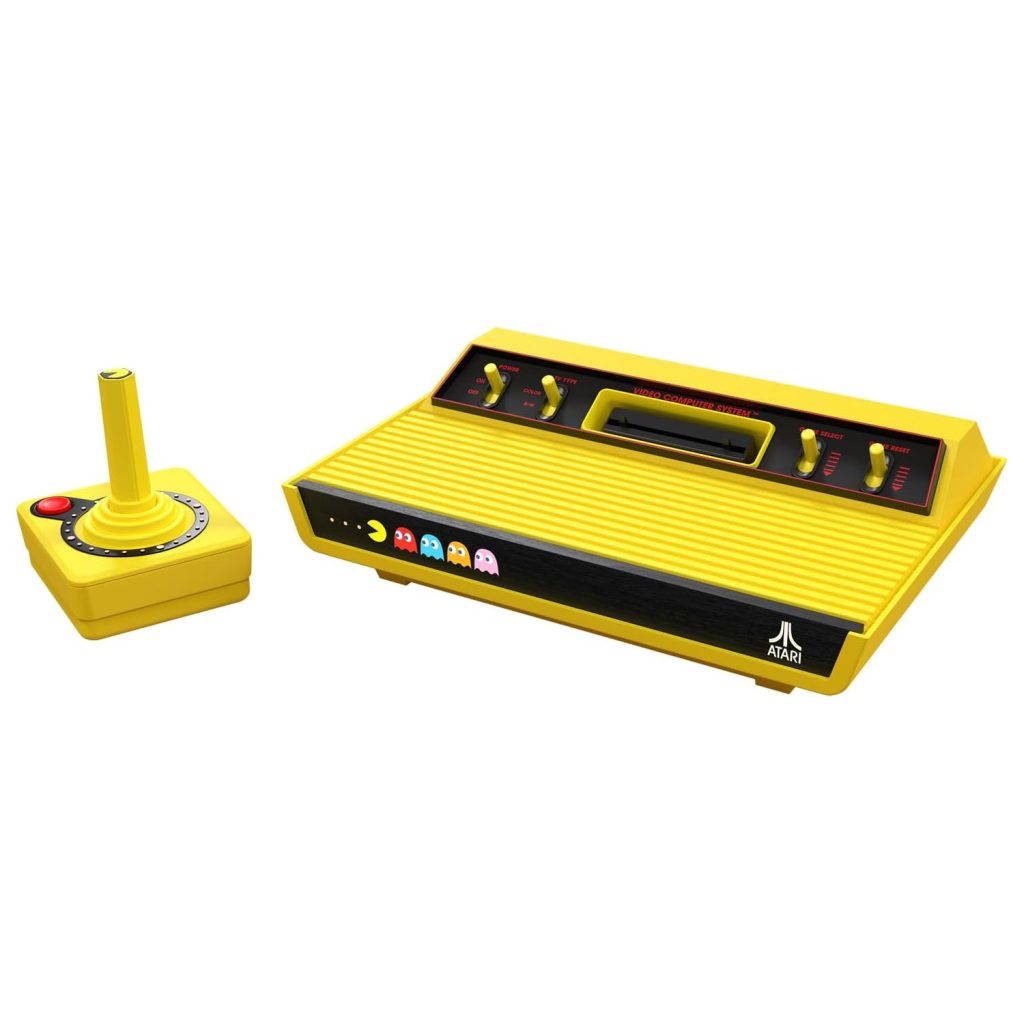
Atari Pac-Man Edition Parent Guide
Atari Pac-Man Edition Parent Guide
Atari Pac-Man Edition Parent Guide helps parents understand how this retro-inspired gaming experience fits into modern family life. This guide focuses on usability, setup, space considerations, age suitability, maintenance, and practical day-to-day use, giving families clear expectations before and after unboxing.
What’s in the Box
The Atari Pac-Man Edition typically includes the main Atari 2600 Plus console, a game cartridge featuring Pac-Man, a joystick controller, and the required power and HDMI cables. The setup mirrors classic home gaming systems while offering updated compatibility for modern televisions. The joystick intentionally replicates the iconic one-button design to maintain the nostalgic feel.
Parents wanting more detail about the manufacturer can explore the Atari brand page. Understanding the brand’s legacy is helpful when comparing accessories, additional game cartridges, or deciding whether the console suits long-term family use.
How It Works
While preparing this Atari Pac-Man Edition Parent Guide, we focused on how quickly families can begin playing. Once connected to the TV and powered on, the console loads the Pac-Man cartridge almost instantly. Gameplay revolves around simple directional inputs and a single action button, making it accessible even for younger or inexperienced players.
The appeal of Pac-Man lies in its short, repeatable rounds. Children learn the mechanics quickly because the aim—avoid ghosts, collect pellets, and navigate the maze—is clear from the start. The game encourages quick thinking, hand–eye coordination, and pattern recognition without requiring complex instructions or tutorials. Families can easily take turns or compete for high scores in short sessions.
Setup, Space & Batteries
Setup is minimal. Connect the HDMI cable to your TV, plug in the power cable, and place the console on a stable surface close to the screen. The joystick cable length is moderate, so ensure children have room to play comfortably without stretching the cable across walkways.
No batteries are required for the console or the controller. All power comes from the included cables. If the console shares space with other media devices, consider organising cables to prevent accidental unplugging. Because children may move while playing, keeping the console slightly out of reach prevents tugging on cables or ports.
Best Age Range & Suitability
The Pac-Man Edition is ideal for children aged 6+ who enjoy simple reflex-based games. Younger children can join in with supervision because the one-button control scheme is far easier than modern multi-button controllers. The game’s fast, predictable loops make it easy to learn while still offering a challenge as levels progress.
The console also appeals to mixed-age families. Adults familiar with the original Pac-Man often enjoy revisiting it, making it a simple shared activity across generations. Its short, focused play sessions make it suitable for quick gaming breaks, after-school winding down, or light family competitions.
Safety Notes
The console and controller are durable but should be kept on a stable surface. Avoid placing the console where younger children can pull on cables or knock it from shelves. Since the joystick has moving parts, parents should periodically check for dust buildup at the base.
As with all electronics, keep drinks and liquids away from the area. The cartridge slot should remain clean and free from debris to preserve long-term performance. Ensure children know not to pull the cartridge out while the console is powered on.
Durability, Cleaning & Storage
The Atari Pac-Man Edition is built from sturdy plastic that handles everyday use well. The joystick is robust but benefits from gentle handling, especially during energetic play sessions. Proper cable management reduces wear and prolongs lifespan.
Cleaning requires only a dry or lightly damp cloth. Avoid any sprays or liquids near ports. When storing the console, coil the controller cable loosely and keep the game cartridge in a protective case or drawer. The compact size makes the system easy to place on a media shelf or inside a TV unit.
Common Issues & Troubleshooting
No picture appearing: Check HDMI connections, confirm the correct TV input, and ensure the cable is fully seated. Trying an alternate HDMI port may resolve signal issues.
Pac-Man fails to load: Remove and reinsert the cartridge firmly. Avoid blowing into the cartridge; use a soft cloth to remove dust from the exterior instead.
Joystick feels unresponsive: Ensure the cable is not twisted or stretched. Most issues stem from loose connections rather than faults in the controller itself.
Tips
As highlighted throughout this Atari Pac-Man Edition Parent Guide, keeping sessions short helps maintain enthusiasm—particularly for children still learning how the ghosts behave in different modes. Encouraging them to watch patterns and anticipate movement makes progress smoother and reduces frustration.
Families often keep a simple score sheet to track high scores. This turns gameplay into a light, cooperative challenge rather than a competitive one. Switching turns every few minutes keeps everyone involved and gives younger players time to rest their hands between attempts.
Alternatives
Parents who enjoy the retro feel of the Pac-Man Edition may want to explore other classic titles available on compatible cartridges. Some families prefer plug-and-play systems with a broader selection of preloaded games, while others enjoy more modern consoles with puzzle or platform games suitable for younger players.
Handheld retro consoles are another option for children who prefer portable play. When comparing alternatives, consider controller complexity, available games, and how much space the system will occupy near your TV setup.
Quick FAQs
Is Pac-Man too difficult for younger players?
Not usually. Removing time pressure and practising movement helps younger children build confidence.
Does gameplay load instantly?
Yes. The cartridge boots quickly once inserted.
How do we keep the controller in good condition?
Store the cable loosely and avoid sharp bends.
Does this support learning?
Yes. The game encourages reaction timing, prediction skills, and simple pattern recognition.
What does this Atari Pac-Man Edition Parent Guide cover?
Setup, suitability, safety, troubleshooting and helping children progress through early stages.
Where Next?
Explore full product details on the Atari 2600 Plus Pac-Man Edition page.
For deeper insights and hands-on discussion, visit the Atari 2600 Plus Pac-Man Edition Review.
Some links on our site are affiliate links. If you buy through them, we may earn a small commission — at no extra cost to you. 🎄